
Applaydu Play & Discover
Ferrero Trading Lux S.A.Educational
4.21.23K Reviews
- Version
- 7.0.0
- Installs
- 50.00M
- Age Rating
- Everyone
Screenshots



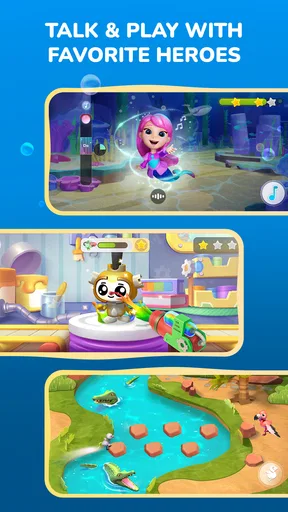




Our Review of Applaydu Play & Discover
 Analysis by Appyee
Applaydu Play & Discover is the kind of children’s game I would look at when a family wants screen time to feel a little more purposeful. It comes from Ferrero Trading Lux S.A. and sits in the educational games category, with a playful world built around activities for children rather than a single long-form adventure. I found its strongest appeal in short sessions: a child can open it for a quick activity, explore for a while, and stop without needing to remember a complicated story.
That flexibility matters in real family life. A child may use it while waiting at an appointment, during a quiet afternoon, or when a parent needs a few minutes to finish a task nearby. The game is free, rated for Everyone, and supports devices running at least iOS or Android version 10. Its broad availability helps explain why it has passed 50 million installs, while its average rating of 4.2 from around 122 thousand ratings suggests that families generally find value in it, even if the experience is not perfect for every child.
Getting past the first points of friction
The first difficulty with a children’s app is often not the game itself. It is getting the right device ready, understanding what appears on screen, and making sure the child knows what to tap. With a colorful app aimed at young players, several buttons may look equally important. I would not hand it over and immediately walk away the first time. A short introduction from an adult can prevent a lot of repeated questions.
I recommend opening the game before giving the device to a child. Check that it reaches the main play area, that the sound level is comfortable, and that the screen responds normally to taps and swipes. This is especially useful on an older phone or tablet, where a game can feel unresponsive because other apps are using memory or because the device is already struggling. The current version is 7.0.0, so keeping the installation current is a sensible first step when the store offers an update.
Another practical point is storage. A child may see an install button and expect the game to be ready immediately, but the device still needs enough free space for installation and normal operation. If the download pauses or the installation fails, I would first remove unused files or apps and retry rather than repeatedly tapping the same button. This simple check solves more setup problems than changing complicated settings.
The age rating of Everyone makes the game suitable for a broad family audience, but that does not mean every activity will match every child’s ability. A preschool child may need help reading or interpreting instructions, while an older child may move through familiar activities quickly. I see it as a game that works best when the adult adjusts expectations to the child, instead of assuming the age label guarantees the same experience for everyone.
What I check before handing over the device
I also test the device’s basic controls. If touch input is inconsistent, the child may appear to be making mistakes when the real problem is a dirty screen, a thick case, or a damaged area of the display. Rotating the device, locking the screen orientation where possible, and closing unrelated apps can make a noticeable difference. These are ordinary checks, but they are particularly important in a game where a young player may not be able to explain why a tap did not register.
Sound deserves attention too. Some children depend on audio cues, while others become distracted by them. I prefer to set the volume before play begins and use headphones only when an adult is comfortable supervising that choice. If the game seems silent, I check the device’s media volume rather than assuming the app is broken. A phone can be unmuted for calls while media playback remains turned down.
I would also establish a simple routine around the app. For example, the child can play after an adult has checked the device, and the device can return to its usual charging place afterward. This is not a feature of the game, but it changes how smoothly the game fits into a household. Without that routine, the child may keep asking for help with the device instead of focusing on the activities.
The most useful setup habit is to test the complete path once before a child uses it alone. Open the game, try one activity, close it, and open it again. That quick rehearsal reveals whether the device has enough space, whether the controls are understandable, and whether the child will need assistance at the exact moment a parent is busy.
Recovering when progress or play does not go smoothly
When an activity stops responding, I avoid immediately reinstalling the game. First, I wait briefly and look for a visible way to return to the previous screen. If the device is busy, tapping repeatedly can make the situation worse because several commands may be queued. A calm pause followed by one deliberate tap is often the better approach for a young player.
If the game closes unexpectedly, I reopen it once and test a different activity. This helps separate a one-time interruption from a wider device problem. If several apps are also freezing, the likely cause is the phone or tablet rather than this particular game. Restarting the device, closing background apps, and checking available storage are safe general recovery steps before considering anything more drastic.
I am careful with reinstalling children’s games because it can affect local progress or settings. I would only use that step after trying a restart and checking for an available update. Before removing the app, I would make sure the child is not relying on saved activity or customization that might disappear. A clean reinstall can help with damaged installation files, but it should not be the first response to every small glitch.
Connection problems can also be misleading. A game may take longer to open or complete an update when the network is weak. If it works normally on one connection but not another, I would restart the router or move closer to the access point before blaming the app. On a mobile device, switching repeatedly between a weak Wi-Fi signal and mobile data can create its own interruptions, so I prefer testing one stable connection at a time.
Parents often ask whether a child can simply continue without help after something goes wrong. My answer depends on the child. The activities are designed to be approachable, but a young player may not know whether a screen is loading, waiting for a tap, or asking for a choice. I would show the child one recovery action, such as returning to the main area, and then let them try it independently. That small lesson reduces dependence on an adult without turning troubleshooting into a frustrating lesson.
Separating game trouble from device trouble
A useful test is comparison. If video playback, another educational game, and ordinary menus all respond slowly, the problem is probably the device, its storage, or its current workload. If only this game has trouble while everything else behaves normally, updating or reinstalling becomes more reasonable. This approach saves time and avoids deleting an app that was working correctly.
Battery level can matter in everyday use as well. Some devices reduce performance when the battery is very low or when they become hot during charging. I prefer not to judge the game while the device is overheating or being used under a blanket. Letting it cool, disconnecting it from the charger, and trying again later gives a fairer picture of normal play.
Touchscreen accessories can create another false alarm. A case with a raised edge may block taps near the border, and a thick protector can make light touches less reliable. If a child repeatedly misses the same area, I test that area myself and remove the case temporarily if necessary. This is a particularly helpful check before reporting a software fault.
For families sharing one tablet, user habits can also look like technical failures. One child may change the volume, another may close the game, and a third may leave many apps open. I would keep the recovery routine consistent: return to the game, check sound, close unrelated apps, and restart only when the device remains unresponsive. Consistency makes the experience less chaotic for both children and adults.
How it fits into learning and everyday play
The educational label is most convincing when the child is actively doing something rather than passively watching. I like the idea of using this game as a change of pace between physical play, reading, drawing, and ordinary family activities. It is not a replacement for hands-on learning, but it can give a child a playful way to practice attention, recognition, and following instructions.
A realistic use case is a short waiting period before dinner. I would open the game, choose an activity that the child already understands, and set an informal stopping point before play begins. That avoids the common problem of an adult announcing the end while the child is in the middle of something. Because the game is built around multiple learning activities, it is better suited to these small windows than an adventure that demands a long uninterrupted session.
I would not use it as an automatic reward for every task, though. If the child starts treating every activity as a race to unlock more screen time, the educational value can fade. A better approach is to ask what the child noticed or enjoyed afterward. Even a simple question about the activity turns solitary tapping into a small conversation and helps an adult see whether the game is genuinely engaging or merely holding attention.
Compared with a traditional children’s video, this game offers more interaction and gives the child a chance to make choices. Compared with a workbook, it is more inviting for a child who resists paper exercises, but it provides less direct evidence of handwriting, drawing control, or sustained offline concentration. Compared with a highly structured learning platform, it may feel lighter and easier to start, while offering less of the formal progression that some parents want for a specific school skill.
That trade-off is important. I would choose it for variety, low-pressure exploration, and short educational play. I would choose a focused phonics, mathematics, or language-learning app when a child needs deliberate practice in one clearly defined area. I would choose a physical book or activity when the main goal is to reduce screen use or build patience away from a device.
Who will enjoy it most
It is a good match for families looking for a free starting point rather than a paid specialist tool. Since there is no purchase price, a parent can try it without committing money, which is useful when a child’s interests change quickly. The large install base also means it is a familiar option for many households, although popularity alone should not decide whether it suits a particular child.
Children who like colorful exploration and switching between different kinds of activities are likely to get more from it than children who want one deep challenge. A child who becomes frustrated by unclear instructions may need an adult nearby at first. An older child seeking complex strategy, competitive play, or a long narrative may outgrow the experience sooner than a younger learner.
I would also skip it when the family’s main requirement is strict academic tracking. This is not the app I would select if I needed detailed reports for a teacher, a carefully sequenced curriculum, or a substitute for guided instruction. Its value is in making learning-flavored play approachable, not in replacing a classroom or a specialist intervention.
My practical verdict after living with its limitations
My overall impression is positive, with a clear boundary around what the game should be expected to do. Applaydu Play & Discover works best as a flexible educational game for short, supervised or semi-independent sessions. It is free, aimed at Everyone, and available on relatively current mobile operating systems, making it easy for many families to test without a major commitment.
The main friction is not a lack of appeal; it is the usual combination of young-user confusion, device condition, storage, sound, and occasional uncertainty about whether a frozen screen is the game or the hardware. Preparing the device first and teaching one simple recovery step makes a bigger difference than constantly changing settings. I would also keep expectations modest: it can enrich a child’s screen time, but it cannot replace conversation, physical materials, reading together, or focused teaching.
The version listed is 7.0.0, and the developer is Ferrero Trading Lux S.A. Those details are useful when checking that the correct app is installed and when deciding whether an update is available. The game’s average rating of 4.2 and roughly 1.2 thousand written reviews point to a generally well-received experience, but I would still judge it by the child’s response after several short sessions rather than by the rating alone.
For a family deciding whether to try it, my advice is straightforward: install it on a device that meets the operating-system requirement, make room for the installation, test one activity yourself, and introduce it during a calm moment rather than handing it over in the middle of a rushed morning. Watch whether the child explores, understands the basic interaction, and can stop without a major argument. Those observations tell you more than a store description can.
I recommend it as a low-pressure addition to a child’s activity rotation, not as a complete learning plan. If you want a friendly way to fill a short wait with interactive play, it is worth trying. If you need measurable academic progression, deep gameplay, or a screen-free solution, another option will be a better fit. That distinction is what makes this game useful: it does one modest job well when the family uses it on its own terms.
Verdict
Strengths of Applaydu Play & Discover
- Creative mini-games encourage exploration and imaginative play.
- Simple controls make it accessible for younger children.
- Includes activities that support basic learning and problem-solving.
- Bright animations and familiar characters keep children engaged.
- Parents can find varied activities in one child-friendly app.
Limitations of Applaydu Play & Discover
- Some content may require internet access to load or function properly.
- The app can take up considerable storage space after updates.
- Younger children may need help navigating menus and activities.
- In-app promotions or branded content may not suit every family.
- Activity quality and appeal can vary depending on the child’s age.
Similar Picks in This Category
View All
Little Panda Policeman
BabyBus4.0

Monster Trucks Game for Kids 2
Raz Games4.1

Little Panda's Chinese Recipes
BabyBus4.4

Little Panda's Restaurant
BabyBus4.4

Little Panda's Ice Cream Games
BabyBus4.3

Baby Panda Care
BabyBus3.8
Frequently Asked Questions
What is Applaydu Play & Discover?
Applaydu Play & Discover is an educational and entertainment app designed for young children, combining interactive games, creative activities, stories, and discovery-based experiences. It is associated with Kinder and includes colorful characters and child-friendly content intended to encourage imagination, early learning, and playful exploration in a safe digital environment.
Is Applaydu Play & Discover suitable for my child’s age?
The app is mainly aimed at preschool and early school-age children, although the ideal experience depends on the child’s reading ability and familiarity with mobile devices. Some activities can be enjoyed independently, while younger children may need help navigating menus or understanding instructions. Parents should check the current age rating and content details before downloading.
Does Applaydu Play & Discover require an internet connection?
Some parts of Applaydu Play & Discover may work after content has been downloaded, but an internet connection can be needed for initial installation, updates, new activities, account-related features, or additional content. Availability may also vary by device and region. It is best to open the app once while connected before giving it to a child for offline use.
Is Applaydu Play & Discover free, and does it include advertisements or purchases?
Applaydu Play & Discover can generally be downloaded without an upfront charge, but parents should review the store listing for the latest information about optional purchases, subscriptions, or additional content. The app is designed for children, so adults should still check payment settings, disable unauthorized purchases, and review privacy permissions before allowing regular use.
Is Applaydu Play & Discover safe for children to use?
Applaydu Play & Discover provides child-focused activities and a colorful interface intended to make exploration approachable for younger users. However, no app should replace parental supervision. Adults should review privacy settings, device permissions, screen-time limits, and any external links or account features. Downloading only from the official Google Play Store or Apple App Store is also recommended.
Play our best games!


